Product Variant Identity: Why Size, Colour and SKU Mismatches Create Commerce Data Errors
Product DataLinqCheck Editorial Team· 8 min read
A product variant is not simply another line in a catalogue.
Published:
A blue medium T-shirt, a black large T-shirt and a green small T-shirt may belong to the same product family, but they are still distinct sellable items. They can have different GTINs, images, prices, stock levels and URLs. If an ecommerce system mixes those identities together, the problem spreads far beyond the product page.
The wrong image can be paired with the wrong colour. An in-stock feed item can lead to an out-of-stock page. Structured data can describe one variant while the interface displays another. A shopping system may no longer be able to tell exactly which product is being offered.
That is why variant identity should be treated as a Product Truth problem, not merely a merchandising detail.
What is product variant identity?
Variant identity answers a simple question:
Which exact sellable item does this information belong to?
Consider a trainer available in:
- White / EU 39
- White / EU 40
- Black / EU 39
- Black / EU 40
These four variants may share a product name, brand and model family. But they can differ in several operational facts:
| Field | Shared or variant-specific? |
|---|---|
| Brand | Usually shared |
| Product family | Shared |
| Colour | Variant-specific |
| Size | Variant-specific |
| SKU | Variant-specific |
| GTIN | Often variant-specific |
| Image | Often variant-specific |
| Price | May be variant-specific |
| Availability | Variant-specific |
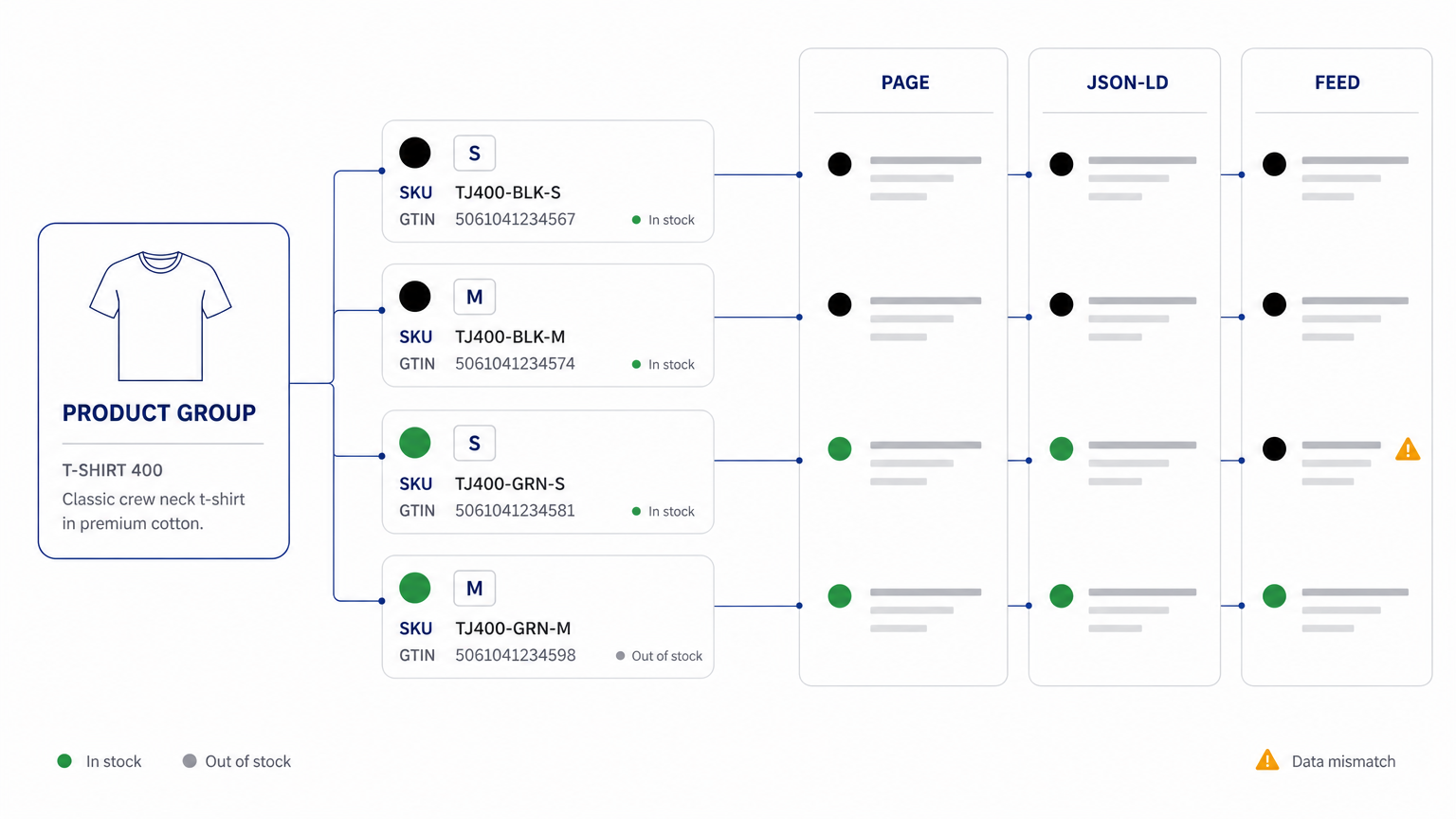
A catalogue therefore needs to represent two different levels of truth at the same time: the product group and the individual variant.
Google makes the same distinction in its structured data documentation. ProductGroup is used to represent a family of products that vary by properties such as size, colour or material, while individual Product entities represent the variants themselves. Google recommends unique identifiers for each variant and a unique identifier for the product group.
Source: https://developers.google.com/search/docs/appearance/structured-data/product-variants
Where variant identity breaks
Most variant problems are not caused by a missing colour field. They appear when several systems disagree about which variant they are describing.
An ecommerce stack may contain the same product in:
- the PIM;
- the ecommerce platform;
- the visible product page;
- JavaScript state;
- JSON-LD;
- a Merchant Center feed;
- marketplace feeds;
- an inventory system;
- analytics or internal catalogue databases.
Each layer may look correct in isolation.
The failure happens when the relationships between them drift.
Example: the page says black, the schema says white
Imagine a customer selects the black version of a backpack.
The visible page updates to:
Colour: Black — £89 — In stock
But the JSON-LD still contains:
"color": "White"
and the image URL in the feed still points to the white version.
A human shopper can probably understand what happened. A machine consuming the page does not have that luxury. It now has several incompatible statements about the same item.
The problem is not that one channel lacks information. The problem is that the information no longer resolves to a single product identity.
That distinction matters.
Product groups are not substitutes for individual variants
Google Merchant Center uses item_group_id to associate variants that belong to the same product family. Its current guidance says that each variant should still be submitted as a separate product, while related variants use the same group identifier. Google also asks merchants to keep variant-defining data such as colour, size, price, availability and image consistent with the landing page.
Source: https://support.google.com/merchants/answer/6324507
That means this structure is conceptually correct:
Product group: Trail Jacket 400
- SKU TJ400-BLK-S — Black / Small
- SKU TJ400-BLK-M — Black / Medium
- SKU TJ400-GRN-S — Green / Small
- SKU TJ400-GRN-M — Green / Medium
This is not:
- one SKU representing all four items;
- one GTIN copied to every variation without evidence;
- a colour field that changes only in the interface;
- different variants accidentally assigned to different product groups.
Google’s documentation on unique product identifiers is equally clear about accuracy: merchants should provide correct identifiers and should not invent or guess GTINs, MPNs or other values. For products available in multiple sizes or colours, Google notes that different variants can require their own unique identifiers.
Source: https://support.google.com/merchants/answer/160161
Why this matters for AI-assisted shopping
AI shopping systems need more than descriptive prose.
Before a product can be compared with another product, a system needs to establish which object it is looking at.
Suppose a shopper asks:
“Which black carry-on suitcase under £150 is in stock in the larger cabin size?”
A useful answer depends on several facts resolving to the same variant:
- this is the black version;
- this is the requested size;
- this exact version costs under £150;
- this exact version is in stock;
- the product image and identifiers refer to that same version.
If the colour belongs to one SKU, the availability to another and the price to the parent product, the catalogue contains plenty of data but weak identity.
This is one reason product-data quality should not be measured only by completeness. Our guide on why missing product data costs you sales looks at the completeness side of the same problem.
A catalogue can be 95% complete and still be difficult to use if its facts are attached to the wrong entities.
For AI Commerce Readiness, correct relationships between facts can matter as much as the number of fields present.
That does not mean clean variant data guarantees inclusion in an AI answer, ranking or recommendation. It means that consistent identity reduces ambiguity for systems trying to interpret and compare products.
The visible page, schema and feed should describe the same variant
Structured data is useful because it gives machines a standardised representation of product information. Google states that Product markup can make pages eligible for merchant listing experiences and can carry fields such as price and availability.
Source: https://developers.google.com/search/docs/appearance/structured-data/merchant-listing
But structured data should not become an alternative version of the product.
The visible page, structured data and feed should agree on the core facts for the selected variant.
For example:
| Layer | Expected value |
|---|---|
| Visible colour | Navy |
| JSON-LD colour | Navy |
| Feed colour | Navy |
| Visible SKU | SH-204-NV-M |
| JSON-LD SKU | SH-204-NV-M |
| Feed ID | SH-204-NV-M |
| Visible stock | In stock |
| Offer availability | InStock |
| Feed availability | in_stock |
Google explicitly asks merchants to match availability between product data, landing pages, checkout and structured data. Similar consistency is important for price, as covered in our guide to price and availability consistency.
Source: https://support.google.com/merchants/answer/7052112
Structured data does not need to duplicate every sentence on the page. But it should not contradict what a user can actually see or buy.
URL behaviour can also define variant identity
Variant URLs are another important part of the model.
Google’s product-variant documentation recommends that sites make each variant directly selectable through a distinct URL, including query-parameter URLs where appropriate. That URL should preselect the correct variant and display the corresponding image, price and availability.
Source: https://developers.google.com/search/docs/appearance/structured-data/product-variants
For example:
/running-shoe?colour=black&size=42
should not open the generic product and silently revert to red size 40.
The URL needs to resolve to a meaningful product state.
This becomes especially important when external systems send a shopper directly to a particular option. If a feed claims to represent “Black / 42” but the landing page cannot reliably reconstruct that choice, product identity is lost during the hand-off.
Five checks ecommerce teams should run
1. Separate parent identity from sellable identity
Define which attributes belong to the product family and which belong to each variant.
Do not assume that model name, SKU and GTIN mean the same thing.
A useful rule is:
Product group = shared commercial concept. Variant = exact purchasable configuration.
2. Trace one variant across every data layer
Choose a single real variant and follow it through:
PIM → ecommerce database → rendered page → JSON-LD → feed → marketplace.
Compare:
- SKU;
- GTIN;
- colour;
- size;
- price;
- availability;
- image;
- URL;
- group identifier.
This often exposes problems that catalogue-wide completeness reports miss. The same discipline appears in the AI visibility checklist for product pages.
3. Check the selected state, not only the initial page state
Variant selectors frequently update visible content dynamically.
Test several combinations rather than analysing only the default selection.
If the visible variant changes but structured data, URL or other machine-readable content does not, the page can describe multiple identities at once.
4. Treat identifiers as facts, not placeholders
Do not create a GTIN merely because a downstream system has a GTIN field.
Google advises merchants not to guess or fabricate product identifiers, and AI tools can invent product facts just as easily.
Source: https://support.google.com/merchants/answer/160161
Unknown should remain unknown until the correct source can verify it.
That is safer than creating false certainty.
5. Recheck price and stock independently
Price and availability change more frequently than brand, material or size.
A product identity model can be correct while its offer data has gone stale.
Google’s Merchant Center guidance specifically requires availability data to match the landing page and structured data.
Source: https://support.google.com/merchants/answer/7052112
Identity and freshness therefore need separate checks.
A simple way to think about Product Truth
Product Truth is not one master description.
It is the set of current, supported facts attached to the correct product entity.
For variants, that means answering three questions:
What is shared?
Brand, model family or common product characteristics.
What varies?
Colour, size, material, memory capacity or another defining option.
Which facts belong to this exact variant right now?
Identifier, price, stock, image and other offer-level details.
When those relationships are explicit, ecommerce teams can generate channel-specific content without losing product identity — one reason marketplace and website copy should never be identical.
When they are not, every downstream system has to infer.
And inference is where product-data errors begin.
How LinqCheck approaches the problem
LinqCheck analyses product pages to identify missing, conflicting or unverifiable information, including product identity signals such as title, brand, category and GTIN. It also evaluates whether a product carries enough clear information to be understood, compared, trusted and acted on by AI-assisted shopping systems.
The important step comes before content generation: establish which facts can actually be supported.
Once the product information is clear, teams can use verified facts to create content suited to their website or marketplace channel rather than propagating an existing inconsistency into more destinations.
The goal is not to maximise the amount of product copy.
It is to reduce ambiguity about what the product is.
Ask LinqCheck: Is your product page really ready for AI systems?
Identifying missing or conflicting information on a product page is important. But once the analysis is complete, a more practical question usually follows:
“What should I fix first?”
We are developing LinqCheck to help answer that question too.
Ask LinqCheck is being designed as an AI-powered assistant that works with LinqCheck analysis results and verified product information. Its purpose is not simply to explain a score or list issues, but to help users understand what matters most and what action they should take next.
The core principle of Ask LinqCheck will remain the same: product information or marketing claims that cannot be supported by available evidence will not be invented. Information extracted from the page, information verified by the user, and missing or conflicting information will remain clearly distinguishable.
- 1Analyze
- 2Identify gaps and conflicts
- 3Complete verified product information
- 4Create channel-ready content
- 5Apply
- 6Recheck
Today, LinqCheck analyzes product pages, extracts product information, and helps create channel-specific content based on verified facts.
With Ask LinqCheck, our goal is to close the “What should I do next?” gap between analysis and action.
LinqCheck is therefore evolving beyond an analysis tool that simply identifies problems into an AI Commerce Readiness platform that helps make product information more understandable, verifiable, and usable across AI Search, shopping agents, and digital commerce channels.
Ask LinqCheck is currently in development.
The practical takeaway
Variant identity is infrastructure.
When SKU, GTIN, colour, size, URL, structured data, price and availability all refer to the same sellable item, search engines, marketplaces and AI-assisted shopping systems have a clearer object to work with.
When they do not, adding more descriptions will not solve the underlying problem.
Start with one variant.
Trace it from the visible page to the structured data and feed.
Then ask the question that matters most:
Do all of these systems agree on exactly what is being sold?
Sources
- Google Search Central — Product Variant Structured Data
https://developers.google.com/search/docs/appearance/structured-data/product-variants - Google Merchant Center — Item group ID
[item_group_id]
https://support.google.com/merchants/answer/6324507 - Google Merchant Center — About unique product identifiers
https://support.google.com/merchants/answer/160161 - Google Merchant Center — Product data specification
https://support.google.com/merchants/answer/7052112 - Google Search Central — Merchant listing structured data
https://developers.google.com/search/docs/appearance/structured-data/merchant-listing - Schema.org — ProductGroup
https://schema.org/ProductGroup
Share this article
Check whether your product page tells one consistent product story.
Analyse a product page with LinqCheck to identify missing, conflicting and unverifiable product information before generating channel-ready content.